Prerana Mulay

Fintech / Feature Design

G-Pay Expense Tracker

Expense Tracker Feature Integration

Client

Personal Project

Duration

Concept Case Study

Role

UX Researcher & Designer

Deliverables

Feature Conceptualization, Budgeting Interface
G-Pay Expense Tracker

Google Pay: Expense Tracker

Project Overview

When I was studying architecture and moved to Pune for it, I had to manage everything on my own, like groceries, food, stationery, rent, and bills. I used Google Pay for my expenses, but because of digitalization, I ended up spending a lot without keeping track. Sometimes, I bought things that I didn't really need, and by the end of the month, I had very little money left. That's when I realized the problem and the importance of having an expense tracker within the app itself.

Goal:To integrate an expense tracking feature within Google Pay to help users monitor spending, set budgets, and make smarter financial decisions.

Project Goals

Track Spending:Help users keep track of expenses automatically.
Make Budgeting Easy:Enable users to set budgets and view progress to save money.
Show Habits:Visualize spending habits for better financial decision-making.
User Satisfaction:Enhance the app utility to keep users happy and engaged.

Problem Statement & Research

The Problem

Many users struggle to keep track of expenses, often relying on manual methods or multiple apps. This leads to overspending, missed payments, and difficulty in budgeting effectively.

Lack of Clarity:Users cannot figure out where their money is going.
Planning Issues:Difficulty planning budgets according to monthly allowances.
Current Gap:Existing UPI apps often lack spending limits, categorization, and visual infographics.

Why Google Pay?

Chosen for its existing user base, trust in security, and convenience for on-the-go tracking.

Design Process: Empathize

Empathy Map Insights

Thinks:I want to set safety limits; excited for insights; manual tracking is hard.
Feels:Frustrated with manual entry; anxious about overspending; overwhelmed by money management.
Does:Manually tracks expenses; overspends; repeatedly checks balance.
Pains:Difficulty tracking expenses; overspending without realizing; financial anxiety.
Gains:Time saved; peace of mind; better understanding of spending patterns.

FEATURE BREAKDOWN

The Solution: Expense Manager

1. Home Screen Integration

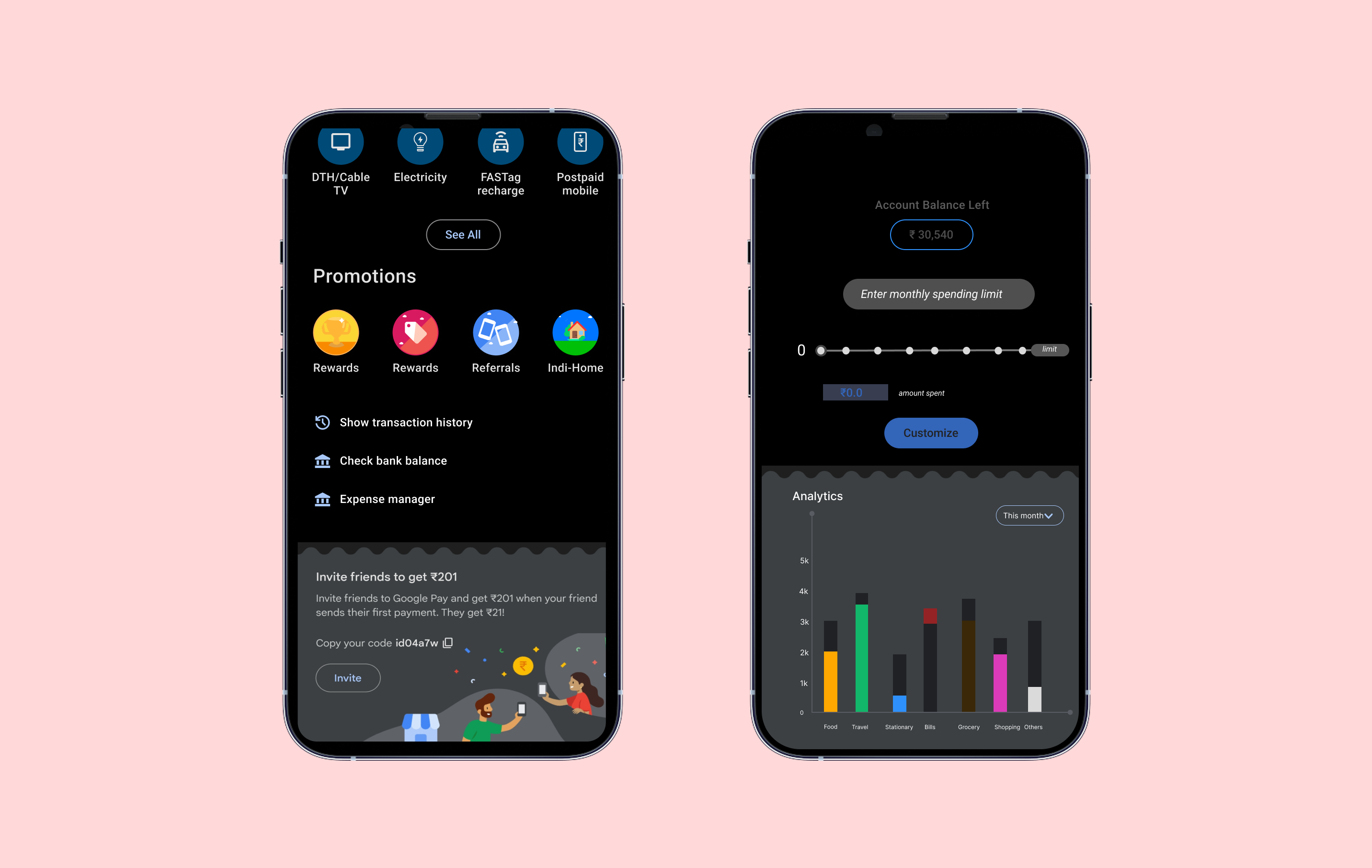
Added an 'Expense Manager' feature directly below transaction history for easy access.

2. Expense Manager Dashboard

Displays account balance and allows setting a monthly spending limit.
Data analytics chart (past 2 months) with spending caps per category.
Horizontal scrolling to view detailed category breakdowns.

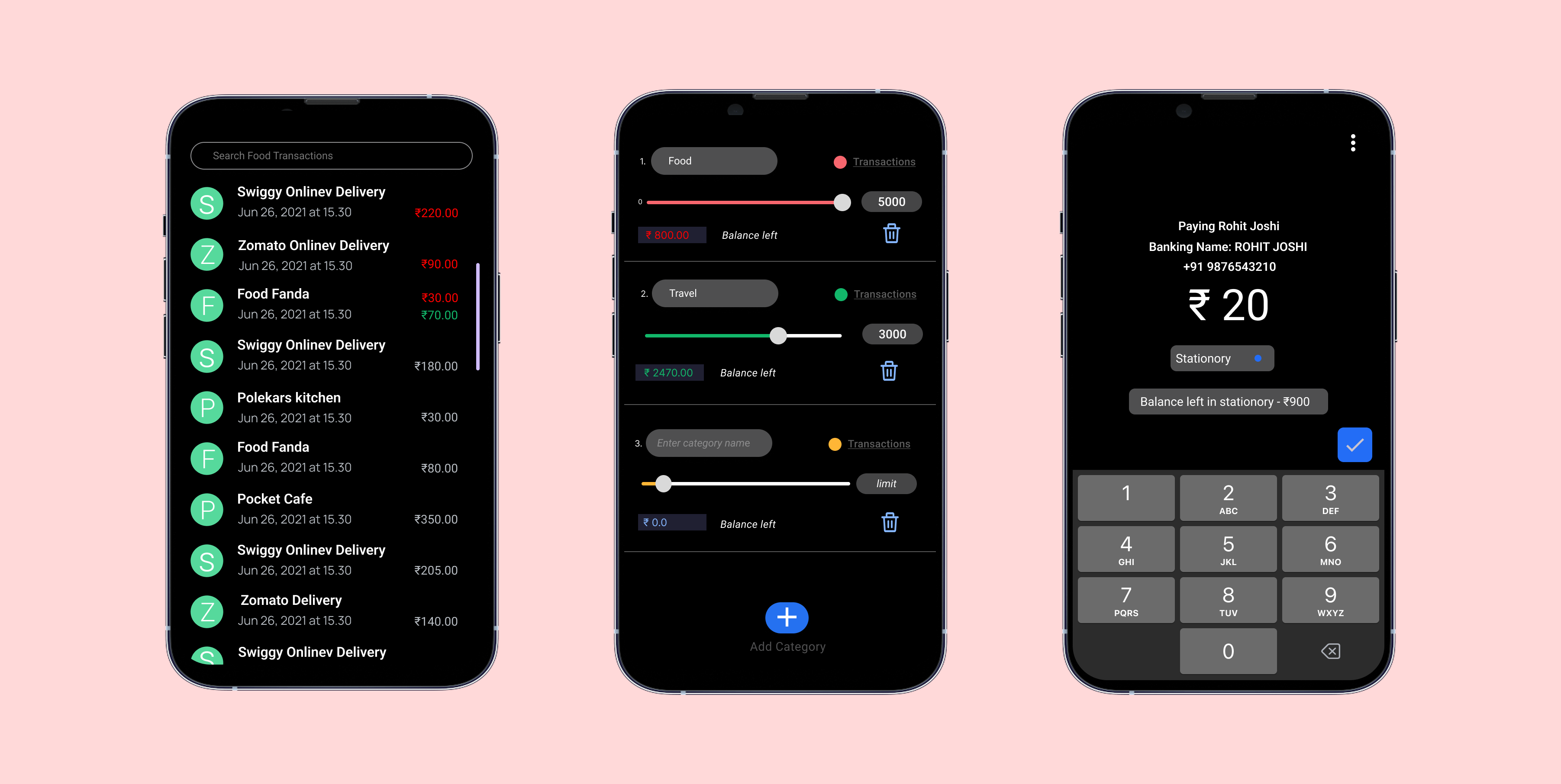
3. Custom Categorization

Users can add/remove categories, each assigned a unique color.
Set specific limits per category (e.g., Food, Travel).
Linear scale visually tracks spending; turns red if the limit is exceeded.

4. Smart Transactions

During payment, users select a category for the expenditure.
Post-transaction tile displays remaining balance in that category.
Visual Feedback: Green tile if within limit, Red tile if over budget.
The Solution: Expense Manager